Getting Started with Allem SDK: React Hooks for AI, Forms & Auth
Allem SDK is a collection of React hooks for AI chat, form validation, authentication, analytics, and utilities. Here is how to install and use it.

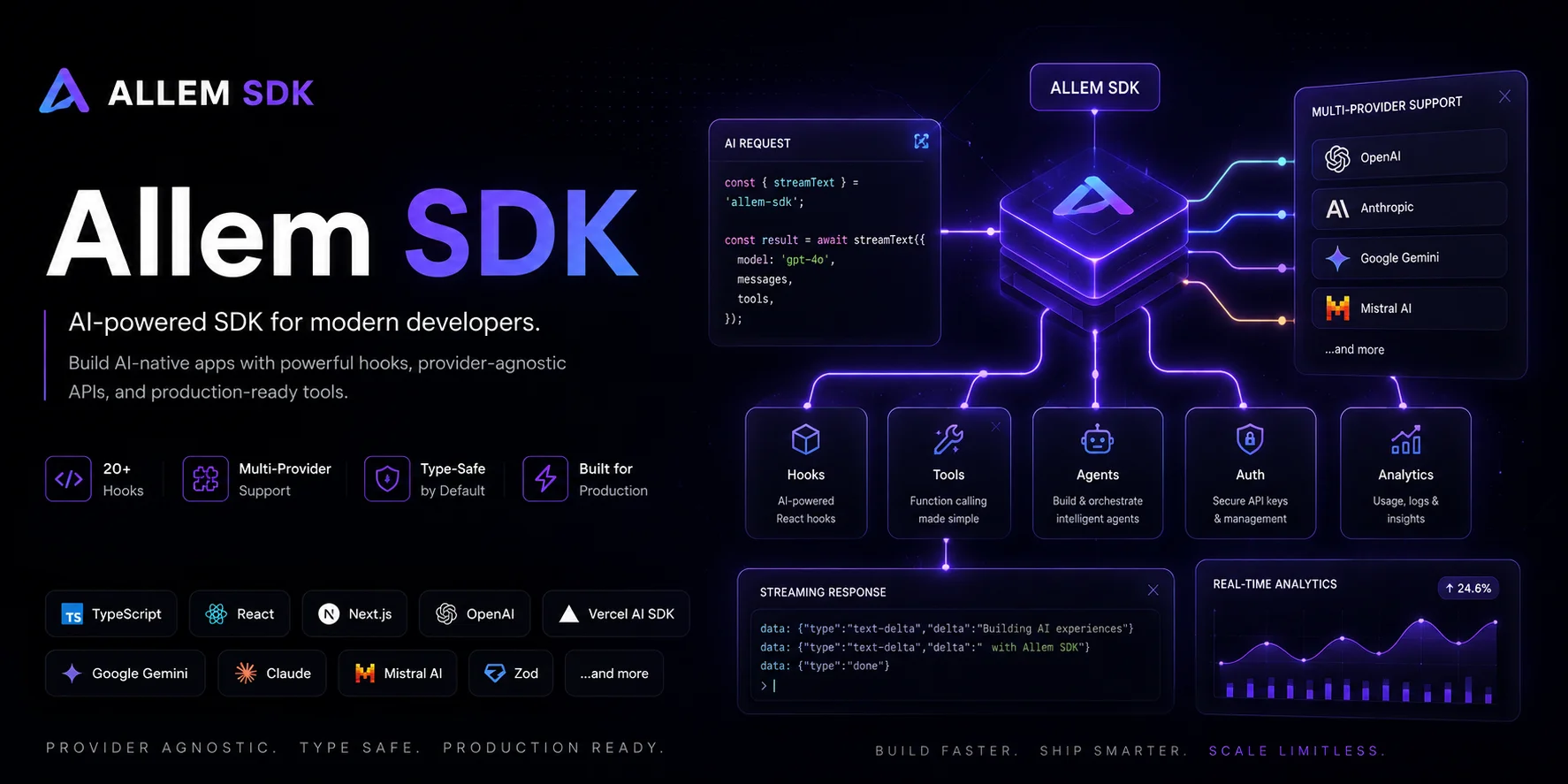
Allem SDK is a collection of React hooks for building modern applications. It provides hooks for AI chat and agents (built on Vercel AI SDK v6), form management with validation, provider-agnostic analytics, authentication with session management, and 8 essential utility hooks.
All hooks are SSR-safe and work with Next.js, Vite, and Remix.
Installation
Install everything at once with the meta-package:
npm install allem-sdk
What You Get
The allem-sdk meta-package includes:
| Package | Description |
|---|---|
@allem-sdk/hooks |
8 essential React hooks (useDebounce, useLocalStorage, useToggle, etc.) |
@allem-sdk/ai |
AI chat and completion hooks (Vercel AI SDK v6) |
@allem-sdk/agents |
Agentic AI with tool calling and step tracking |
@allem-sdk/forms |
Form management with 9 built-in validators |
@allem-sdk/analytics |
Provider-agnostic analytics (Mixpanel, PostHog, etc.) |
@allem-sdk/auth |
Authentication and session management |
Or Pick What You Need
# Just the utility hooks
npm install @allem-sdk/hooks

# Forms + validation
npm install @allem-sdk/forms

# AI chat (requires peer dependencies)
npm install @allem-sdk/ai ai @ai-sdk/react @ai-sdk/google

# Agents (extends AI)
npm install @allem-sdk/agents @allem-sdk/ai ai @ai-sdk/react @ai-sdk/google zod
Import Patterns
Allem SDK supports three import styles:
// From the meta-package
import { useDebounce, useForm, useAuth } from "allem-sdk";

// Sub-path imports
import { useDebounce } from "allem-sdk/hooks";
import { useAllemChat } from "allem-sdk/ai";

// From individual packages
import { useDebounce } from "@allem-sdk/hooks";
import { useAllemChat } from "@allem-sdk/ai";
All three work the same way. Use whichever style fits your project.
Utility Hooks
The @allem-sdk/hooks package provides 8 hooks that replace common boilerplate patterns:
import {
  useDebounce,
  useLocalStorage,
  useMediaQuery,
  useClickOutside,
  useToggle,
  useCopyToClipboard,
  useIntersectionObserver,
  useWindowSize,
} from "@allem-sdk/hooks";
useDebounce
Debounce any value. Ideal for search inputs and API calls:
const [query, setQuery] = useState("");
const debouncedQuery = useDebounce(query, 500);

useEffect(() => {
  if (debouncedQuery) fetchResults(debouncedQuery);
}, [debouncedQuery]);
useLocalStorage
Persistent state that syncs with localStorage. SSR-safe:
const [theme, setTheme] = useLocalStorage("theme", "light");
const [count, setCount, resetCount] = useLocalStorage("count", 0);
setCount((prev) => prev + 1);
useToggle
Replace the common useState(false) + toggle pattern:
const [isOpen, toggle, setOpen] = useToggle(false);

<button onClick={toggle}>Toggle</button>
<button onClick={() => setOpen(false)}>Close</button>
useMediaQuery
Reactive CSS media query matching:
const isMobile = useMediaQuery("(max-width: 768px)");
const prefersDark = useMediaQuery("(prefers-color-scheme: dark)");
useCopyToClipboard
Copy text with a 2-second confirmation state:
const [copied, copy] = useCopyToClipboard();

<button onClick={() => copy("npm install allem-sdk")}>
  {copied ? "Copied!" : "Copy"}
</button>
useClickOutside
Dismiss dropdowns and modals on outside click:
const ref = useRef<HTMLDivElement>(null);
useClickOutside(ref, () => setIsOpen(false));

return <div ref={ref}>...</div>;
useWindowSize and useIntersectionObserver
const { width, height } = useWindowSize();
const isDesktop = width >= 1024;

const ref = useRef<HTMLDivElement>(null);
const isVisible = useIntersectionObserver(ref, { threshold: 0.5 });
All hooks are SSR-safe. They return sensible defaults on the server and activate on mount.
AI Chat
Build AI-powered chat interfaces with @allem-sdk/ai, powered by Vercel AI SDK v6.
Client Setup
Wrap your app with AllemAIProvider to configure the API endpoint and default provider:
import { AllemAIProvider } from "@allem-sdk/ai";

<AllemAIProvider api="/api/chat" provider="google" model="gemini-2.0-flash">
  <App />
</AllemAIProvider>
Then use the useAllemChat hook in any component:
import { useAllemChat } from "@allem-sdk/ai";

function Chat() {
  const { messages, sendMessage, status } = useAllemChat();
  const isLoading = status === "submitted" || status === "streaming";

  return (
    <div>
      {messages.map((m) => (
        <div key={m.id}>
          {m.parts?.filter((p) => p.type === "text").map((p) => p.text).join("")}
        </div>
      ))}
      <button onClick={() => sendMessage({ text: "Hello!" })} disabled={isLoading}>
        Send
      </button>
    </div>
  );
}
Server Route
Create an API route that handles the chat requests:
// app/api/chat/route.ts
import { createAllemChatHandler } from "@allem-sdk/ai";
import { google } from "@ai-sdk/google";
import { anthropic } from "@ai-sdk/anthropic";

export const POST = createAllemChatHandler({
  providers: {
    google: (model) => google(model ?? "gemini-2.0-flash"),
    anthropic: (model) => anthropic(model ?? "claude-sonnet-4-20250514"),
  },
  defaultProvider: "google",
  systemPrompt: "You are a helpful assistant.",
});
The handler automatically routes to the correct provider based on the provider field in the request body. Set your API keys in .env.local:
GOOGLE_GENERATIVE_AI_API_KEY=your_key
ANTHROPIC_API_KEY=your_key  # optional
Override Per Hook
Each hook call can override the provider defaults:
const { messages, sendMessage, status } = useAllemChat({
  provider: "anthropic",
  model: "claude-sonnet-4-20250514",
  systemPrompt: "You are a coding assistant.",
});
AI Agents
Build agentic AI with tool calling using @allem-sdk/agents:
Define Tools on the Server
// app/api/agent/route.ts
import { createAllemAgentHandler, createAllemTool } from "@allem-sdk/agents";
import { google } from "@ai-sdk/google";
import { z } from "zod";

const weatherTool = createAllemTool({
  description: "Get the current weather for a location",
  parameters: z.object({ city: z.string() }),
  execute: async ({ city }) => ({ city, temperature: 72, condition: "sunny" }),
});

export const POST = createAllemAgentHandler({
  providers: {
    google: (model) => google(model ?? "gemini-2.0-flash"),
  },
  tools: { weather: weatherTool },
});
Use the Agent Hook
import { AllemAIProvider } from "@allem-sdk/ai";
import { useAllemAgent } from "@allem-sdk/agents";

function Agent() {
  const { messages, sendMessage, agentStatus, steps, currentToolCalls } = useAllemAgent();

  return (
    <div>
      {agentStatus === "calling-tool" && (
        <p>Using tool: {currentToolCalls[0]?.toolName}</p>
      )}
      {messages.map((m) => (
        <div key={m.id}>
          {m.parts?.filter((p) => p.type === "text").map((p) => p.text).join("")}
        </div>
      ))}
      <p>Steps taken: {steps.length}</p>
    </div>
  );
}

// Wrap with the AI provider pointing to the agent route
<AllemAIProvider api="/api/agent" provider="google">
  <Agent />
</AllemAIProvider>
The agentStatus gives you granular state: "idle", "thinking", "calling-tool", or "done".
Form Management
Build validated forms with @allem-sdk/forms:
import { useForm, required, email, minLength, min, max } from "@allem-sdk/forms";

function SignupForm() {
  const form = useForm({
    name: { initialValue: "", rules: [required()] },
    email: { initialValue: "", rules: [required(), email()] },
    age: { initialValue: 0, rules: [min(18, "Must be 18+"), max(120)] },
    bio: { initialValue: "", rules: [required(), minLength(10)] },
  });

  const onSubmit = async (values) => {
    await fetch("/api/signup", { method: "POST", body: JSON.stringify(values) });
  };

  return (
    <form onSubmit={form.handleSubmit(onSubmit)}>
      <input {...form.getFieldProps("name")} />
      {form.touched.name && form.errors.name && <span>{form.errors.name}</span>}

      <input {...form.getFieldProps("email")} />
      {form.touched.email && form.errors.email && <span>{form.errors.email}</span>}

      <input type="number" {...form.getFieldProps("age")} />
      <textarea {...form.getFieldProps("message")} />

      <button type="submit" disabled={form.isSubmitting}>Sign Up</button>
      <button type="button" onClick={form.reset}>Reset</button>
    </form>
  );
}
9 Built-in Validators
| Validator | Usage |
|---|---|
required(msg?) |
Field must not be empty |
email(msg?) |
Valid email format |
url(msg?) |
Valid URL |
minLength(n, msg?) |
Minimum string length |
maxLength(n, msg?) |
Maximum string length |
min(n, msg?) |
Minimum numeric value |
max(n, msg?) |
Maximum numeric value |
pattern(regex, msg?) |
Must match regex |
custom(fn) |
Custom validation function |
Compose them: rules: [required(), minLength(3), maxLength(50)].
Custom Validators
import { custom } from "@allem-sdk/forms";

const passwordStrength = custom<string>((value) => {
  if (value.length < 8) return "Must be at least 8 characters";
  if (!/[A-Z]/.test(value)) return "Must contain an uppercase letter";
  if (!/[0-9]/.test(value)) return "Must contain a number";
  return undefined;
});
Analytics
Track events across multiple analytics providers with @allem-sdk/analytics:
import { AnalyticsProvider, useTrack, usePageView, useIdentify } from "@allem-sdk/analytics";

// Create adapters for your analytics providers
const mixpanelAdapter = {
  track: (event, props) => mixpanel.track(event, props),
  page: (name, props) => mixpanel.track_pageview({ page: name, ...props }),
  identify: (userId, traits) => mixpanel.identify(userId),
};

const posthogAdapter = {
  track: (event, props) => posthog.capture(event, props),
  page: (name, props) => posthog.capture("$pageview", { page: name, ...props }),
  identify: (userId, traits) => posthog.identify(userId, traits),
};

// Wrap your app — events go to all adapters
<AnalyticsProvider adapters={[mixpanelAdapter, posthogAdapter]}>
  <App />
</AnalyticsProvider>

// In any component
function ProductPage() {
  usePageView("Product Page", { productId: "123" });
  const track = useTrack();
  const identify = useIdentify();

  return (
    <button onClick={() => track("Add to Cart", { productId: "123", price: 29.99 })}>
      Add to Cart
    </button>
  );
}
The adapter pattern means zero vendor lock-in. Switch analytics providers by swapping an adapter, not rewriting event calls.
Authentication
Add authentication with @allem-sdk/auth:
import { AuthProvider, useAuth, ProtectedRoute } from "@allem-sdk/auth";

// Create an adapter for your auth backend
const authAdapter = {
  getSession: async () => {
    const res = await fetch("/api/auth/session");
    if (!res.ok) return { user: null, token: null, expiresAt: null };
    return res.json();
  },
  signIn: async (credentials) => {
    const res = await fetch("/api/auth/signin", {
      method: "POST",
      body: JSON.stringify(credentials),
    });
    return res.json();
  },
  signOut: async () => {
    await fetch("/api/auth/signout", { method: "POST" });
  },
};

// Wrap your app
<AuthProvider adapter={authAdapter}>
  <App />
</AuthProvider>
Protect Routes
<ProtectedRoute fallback={<LoginPage />} loadingFallback={<Spinner />}>
  <Dashboard />
</ProtectedRoute>
Use Auth State
function Header() {
  const { user, status, signIn, signOut } = useAuth();

  if (status === "loading") return <Spinner />;
  if (status === "unauthenticated") return <button onClick={() => signIn({ email, password })}>Sign In</button>;

  return (
    <div>
      <p>Welcome, {user?.name}</p>
      <button onClick={signOut}>Sign Out</button>
    </div>
  );
}
Access Session Tokens
import { useSession } from "@allem-sdk/auth";

const { session, update } = useSession();
const headers = { Authorization: `Bearer ${session?.token}` };

// Refresh after profile update
await update();
Core Conventions
SSR Safety
All hooks check typeof window before accessing browser APIs. They return sensible defaults on the server and activate on mount. No extra configuration needed for Next.js, Remix, or any SSR framework.
Adapter Pattern
The AI, analytics, and auth packages all use an adapter pattern. You provide a thin adapter object that maps to your backend or provider. This means:
- Zero vendor lock-in — swap providers by changing the adapter
- Multi-provider support — analytics sends to all adapters simultaneously
- Test-friendly — pass a mock adapter in tests
Client Components
All hooks include the "use client" directive. In Next.js App Router, import them directly in server components — the directive is already in the package.
What's Next
Each package has its own detailed guide:
- @allem-sdk/hooks — 8 utility hooks
- @allem-sdk/ai — AI chat and completion
- @allem-sdk/agents — Agentic AI with tools
- @allem-sdk/forms — Form management
- @allem-sdk/analytics — Analytics tracking
- @allem-sdk/auth — Authentication
Install it with npm install allem-sdk, browse all packages on npm, and star the repo on GitHub.
Enjoyed this article?
I write about building products, AI, aviation, and the journey of entrepreneurship. Follow along for more.
Keep reading
Getting Started with Allem UI Date Picker: Accessible Calendars for React
Learn how to set up @allem-ui/date-picker with Calendar, DatePicker, DateRangePicker, and TimeField components built on React Aria.

Getting Started with Allem UI Data Grid: Sortable, Filterable Tables for React
Learn how to set up @allem-ui/data-grid with TanStack Table to build sortable, filterable, and paginated data tables in React.

Getting Started with Allem UI React: Build Accessible Interfaces in Minutes
Learn how to install @allem-ui/react, set up Tailwind CSS v4, and build your first accessible interface with 30+ production-ready components.